Crystal Skull
By Saswata Mohanta→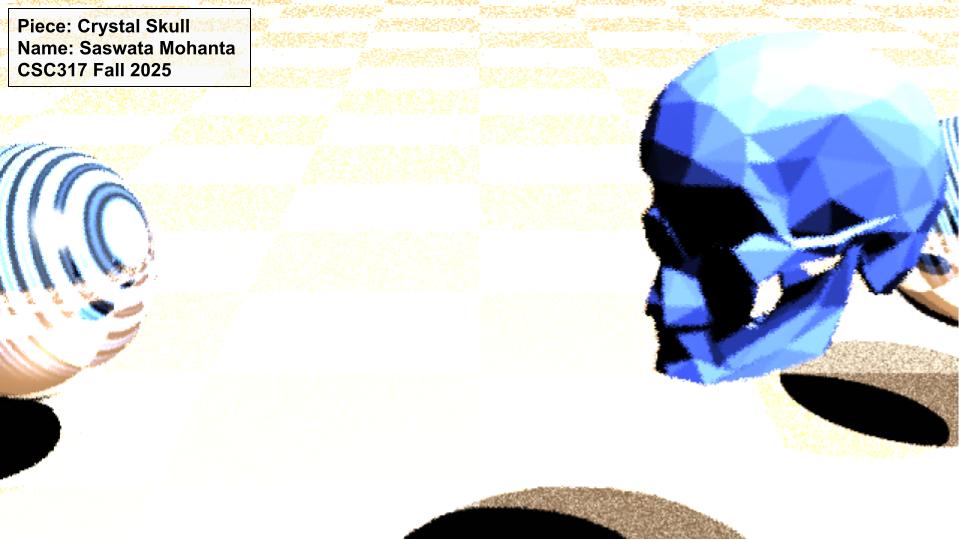
For the showcase, I extended the A3 ray tracer and built a scene called Crystal Skull. It shows a translucent glass skull sitting on a checkered floor with two reflective metal spheres and a light setup that creates strong highlights and shadows. I added several new features to the original assignment to make the render look more interesting.
Features added
1. Refraction (Glass Material)
I added an index of refraction field to the Material class and implemented refraction inside raycolor.cpp. This lets objects behave like glass and bend light.
2. Fresnel Blending
I mixed reflection and refraction using the Fresnel term. This gives the crystal skull more realistic edges and bright highlights.
3. Depth of Field (Camera Blur)
I changed the code in main.cpp to jitter rays around the aperture and focus distance. This creates a shallow “depth of field” effect so the background gets a blur.
4. Procedural Textures
In blinn_phong_shading.cpp I added simple functions to generate checker patterns on planes and a fake marble effect for spheres. This removes the need for texture files and still gives the scene detail.
5. Reflective Surfaces
I kept recursive reflections but tuned material values to get stronger metal reflections.
6. Triangle Mesh Support
I used the provided STL loader with a skull mesh (skull.stl) and set it to use the glass material.