Octahedrons and Sphere
By Sihao(Hardy) Liang→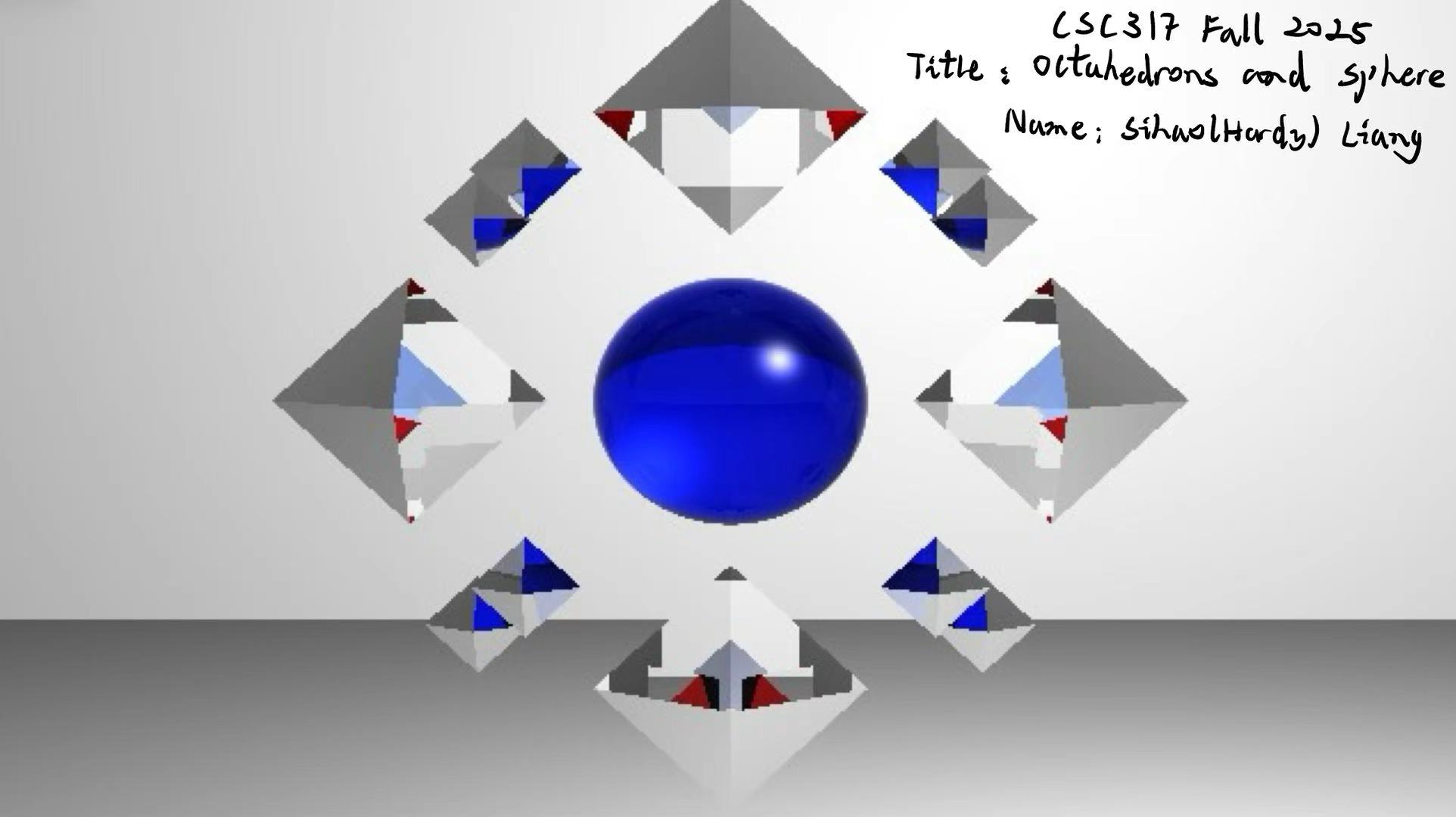
Description of the Rendered Piece
I was planning to render an image featuring a symmetrical, floating geometric composition centered around a blue, clear sphere (IOR 1.5). Surrounding the sphere are four large clear diamond octahedrons (Index of Refraction 2.4) and eight smaller red octahedrons (IOR 1.76). However, as there are some rendering errors occurring, causing the wrong colour rendering in the octahedrons, but it looks interesting than when I first planned. So I decided to keep it and submit it.
List of Implemented Features
1. Refraction (Snell’s Law)
- What it does: Allows light to pass through objects, bending the ray direction based on the material’s Index of Refraction (IOR). This creates the realistic distortion seen in the diamonds and rubies.
- Where it is applied:
- File: raycolor.cpp
- Code: The refract() helper function calculates the transmission vector using Snell’s Law. Inside the recursive raycolor loop, the code checks if (mat->is_refractive) to spawn transmission rays instead of just reflection rays.
2. Fresnel Effect (Schlick’s Approximation)
- What it does: Simulates the physical phenomenon where glass looks clear when viewed head-on but becomes mirror-like at glancing angles. This gives the gemstones their realistic “shiny edges” while remaining transparent in the center.
- Where it is applied:
- File: raycolor.cpp
- Code: The fresnel_schlick() helper function calculates a reflection ratio (kr). This ratio is used to linearly interpolate (mix) between the Reflected Color and the Refracted Color in the final shading calculation.
3. Colored Light Transmission
- What it does: As light passes through the “Ruby” objects, it picks up the red color of the material. However, error occurs and the large diamond actually picks up the red color instead of the small ones.
- Where it is applied:
- File: raycolor.cpp
- Code: In the refraction mixing step, the refracted color is multiplied by the material’s diffuse color: refract_color.cwiseProduct(mat->kd).
4. Transparent Shadows
- What it does: Prevents transparent objects from casting solid black shadows. Instead of blocking the light source entirely, the glass objects allow light to reach surfaces behind them (ignoring the refractive object during the shadow check). Error of rendering also occurs here and create random grey blocks among the octahedrons.
- Where it is applied:
- File: blinn_phong_shading.cpp
- Code: Inside the shadow ray logic (if (first_hit(…))), a check was added: if (!objects[s_hit_id]->material->is_refractive). This ensures that only opaque objects trigger the in_shadow = true flag.
5. Procedural Sky Background
- What it does: Replaces the default black void with a vertical gradient (Blue-to-White). Errors here is it only create some sky-blue color block in the octahedrons.
- Where it is applied:
- File: raycolor.cpp
- Code: At the very top of the function, if !first_hit(…) is true, the function calculates a gradient based on the ray’s Y-direction (ray.direction.y()) instead of returning black.
6. Custom 3D Geometric Composition
- What it does: A manually constructed scene defining 3D octahedrons using raw triangles. These objects have depth (Z-axis thickness), allowing rays to enter, travel through a volume, and exit.
- Where it is applied:
- File: creative.json
- Code: The objects list defines 12 distinct octahedrons (96 individual triangles) positioned symmetrically around the origin.